Introduction to Network Operations Center (NOC) Design
In today’s fast-paced digital landscape, the heart of efficient IT infrastructure management lies within the Network Operations Center (NOC). This pivotal hub serves as the central point for monitoring, managing, and maintaining a company’s IT network, ensuring seamless functionality. Understanding the essence of a NOC and the critical elements that go into its design and layout is crucial for any organization that relies on high performance and swift incident resolution.

Brief Overview: What is a NOC?
A Network Operations Center, often abbreviated as NOC, is a centralized facility where IT professionals actively monitor the status of network operations. This involves identifying and resolving potential issues across various computing environments in real-time. The NOC serves as the nerve center for network administration, enabling the proactive handling of network security threats, server downtime, and various IT-related issues before they escalate.
Why Design and Layout Matter for Operational Efficiency and Incident Response
The design and layout of a NOC are more than just about aesthetics; they are crucial for operational efficiency and effective incident response. A well-designed NOC layout facilitates smooth communication and minimizes the time taken to detect and address issues. By optimizing space, technology placement, and team ergonomics, organizations can enhance coordination and speed up decision-making processes. This becomes particularly critical in high-stakes situations where every second counts.
Importance of Ergonomic, Secure, and Scalable Design for 24/7 Operations
For a NOC to function optimally around the clock, ergonomic considerations are vital. An ergonomic design ensures that IT professionals can work comfortably and efficiently, reducing fatigue and the risk of errors. Security is another cornerstone of NOC design—protecting sensitive data and ensuring uninterrupted service. Moreover, as businesses grow, the ability to scale the NOC’s operations quickly is crucial. A scalable design enables the easy integration of new technologies and additional resources without requiring major overhauls, ultimately saving time and costs in the long run.
What You Will Learn
In the sections that follow, readers will gain insights into the key principles of NOC design and layout, including tips on optimizing space and technology usage. We will delve into best practices for creating ergonomic workspaces, discuss security measures integral to a modern NOC, and explore strategies for ensuring scalability to future-proof operations. By understanding these aspects, readers will be empowered to design or upgrade their NOC for maximum efficiency and resilience in an evolving technological landscape.
Rows of Desks Facing a Central Video Wall
In the modern design of network operations centers (NOCs), layouts involving rows of desks facing a central video wall are becoming increasingly popular. This strategic arrangement combines functionality with visual accessibility, creating an environment conducive to effective monitoring and swift action. Here’s a closer look at how this setup benefits technical teams.
Standard Layout with Clear Line of Sight
The standard layout of rows of desks ensures that every technician has an unobstructed view of the central video wall. This central video wall displays real-time data, network activity, performance metrics, and alerts, serving as the focal point for decision-making. By positioning desks in this orderly fashion, each team member can stay informed of the latest developments without needing constant verbal updates or relying on individual monitors. This arrangement maximizes space efficiency while ensuring that all essential information is easily accessible.
Enhanced Team Coordination and Shared Awareness
A significant advantage of this layout is the improvement in team coordination and shared situational awareness it fosters. When all technicians are oriented in the same direction, focusing on the same set of data, it encourages a collaborative atmosphere where information flows more freely. This common visual reference enhances understanding and reduces the time spent interpreting individual reports or data sets. The shared awareness created by this setup ensures that everyone is aligned with current network statuses, making it easier to work together towards common goals or initiatives.
Rapid Incident Detection and Cross-Team Communication
One of the primary objectives of a NOC is to detect incidents as quickly as possible, thereby minimizing disruptions. The video wall plays a critical role in achieving this goal by acting as an early warning system. By having immediate visibility of emerging issues, technicians can swiftly identify and respond to anomalies. Additionally, the rows-facing-ward design improves communication across diverse teams. The visibility enables non-verbal cues and immediate acknowledgment of alerts, facilitating faster consensus-building and problem-solving. This setup ensures that the entire team can respond promptly, reducing response times and enhancing overall efficiency.
Having rows of desks facing a central video wall is more than a design choice; it’s a strategic alignment of resources and information flow that benefits technical teams in significant ways. By providing a clear line of sight, fostering team coordination, and enabling rapid detection and communication, this layout optimizes both individual and collective performance in high-pressure environments.
Video Wall Displaying Alarms, Incidents, and Performance Dashboards
In the modern Network Operations Center (NOC), the video wall serves as the command hub, offering a panoramic view of network activities and pivotal insights. As the centerpiece of the NOC, the video wall not only provides real-time data but also underpins the efficiency and effectiveness of the network management team. This setup plays a critical role in maintaining network health, swiftly addressing alerts, and optimizing performance through its multifaceted functionalities.
The Centerpiece of the NOC—Real-Time Display of Network Health, Alerts, and KPIs
A well-designed video wall is more than just a collection of screens; it’s a comprehensive visual display that synthesizes complex data into actionable insights. By showcasing key performance indicators (KPIs), real-time metrics, and immediate alerts, engineers can maintain an ongoing understanding of network conditions. This dynamic visualization helps identify potential issues before they evolve into significant problems, facilitating proactive rather than reactive management.
This constant flow of information means that network health is continuously monitored, with alerts appearing the moment irregularities occur. Whether it’s a sudden drop in bandwidth or an unexpected outage, the video wall ensures nothing goes unnoticed, allowing for immediate action to be planned and executed.
Supports Decision-Making During Incidents and Performance Tuning
During an incident, quick and informed decision-making is crucial. The comprehensive data provided by the video wall enables engineers to assess situations rapidly and develop solutions based on real-time evidence. Detailed displays of performance metrics and historical data comparisons support the decision-making process, equipping teams with the knowledge to efficiently tackle incidents.
Beyond incident management, the video wall plays a crucial role in performance tuning and optimization. By continuously displaying performance trends and analysis, engineers can identify areas for improvement and fine-tune the network infrastructure to enhance overall efficiency. This data-driven approach ensures that tuning efforts are accurately focused, leading to enhanced system stability and performance.
Integrates Feeds from Monitoring Tools Like SolarWinds, Nagios, and Custom Dashboards
The video wall’s strength lies in its ability to consolidate diverse data sources into a cohesive interface. By integrating feeds from leading monitoring tools such as SolarWinds and Nagios, as well as custom dashboards, it offers a unified view of all operational metrics and alerts. This integration streamlines the data management process, removing the need to toggle between different applications and interfaces.
These comprehensive data feeds enable intricate cross-analysis, providing a holistic view of network operations and enhancing situational awareness, ultimately contributing to more effective problem-solving. The flexibility to incorporate custom dashboards further enables organizations to tailor the video wall displays according to their specific operational requirements, ensuring that relevant information is prioritized for each unique environment.
The video wall in an NOC serves as the nerve center for network management, empowering engineers with real-time insights, supporting decisive actions during critical incidents, and integrating disparate data streams into a valuable, comprehensive view of information. Its multifunctional role not only enhances daily operations but also strategically positions any organization to react swiftly in an increasingly digital and fast-paced landscape.
Corner Display for News, Weather, or TV Feeds
In an increasingly interconnected world, being informed is not only beneficial but also essential, especially for organizations that rely heavily on network operations. A corner display dedicated to news, weather, or TV feeds provides a streamlined way to access critical information, enabling rapid responses to external conditions that could impact network functionality. Let’s explore the benefits of having this dedicated monitoring tool.
Dedicated Screen for Monitoring External Conditions
A corner display serves as a vital tool for real-time monitoring of external conditions, such as weather events and cyber incidents, that may pose risks to network operations. By having live feeds from reliable news sources or specialized channels, engineers and network managers can stay ahead of potential threats. For instance, approaching storms can be tracked, allowing for preemptive measures to safeguard infrastructure. Similarly, updates on cybersecurity threats can be acted upon immediately, reducing downtime and mitigating risks.
Crucial for Global Service Providers with Weather-Sensitive Infrastructure
For global service providers, whose infrastructure often spans various climatic zones, the importance of being prepared cannot be overstated. Weather-sensitive systems, such as satellite and broadcast services, require constant vigilance to maintain uninterrupted delivery. The corner display serves as a vital hub for weather alerts, allowing operators to make informed decisions promptly. By understanding the potential impact of adverse weather conditions, companies can optimize their operations, schedule maintenance, reroute traffic, or even temporarily halt services to avoid damage.
Useful During Crisis Management for Quick Updates on Public Incidents
During crises, timely information is a cornerstone of effective response management. Whether it’s a natural disaster or a significant public incident, having a dedicated screen for news updates ensures that critical information is accessible at a glance. This tool enables engineers and crisis management teams to coordinate with precision, leveraging the latest developments to refine their strategies and ensure the safety and reliability of their networks. Quick decision-making, informed by real-time data, can dramatically reduce the impact of a crisis, maintaining service stability and protecting infrastructure integrity.
A corner display dedicated to monitoring news, weather, or TV feeds provides invaluable support in maintaining robust network operations. It empowers organizations to proactively manage potential threats, optimize infrastructural performance across diverse environments, and ensure readiness during times of crisis. As technology continues to evolve, the integration of such displays into operational frameworks becomes an indispensable asset.
Glazed Wall Partition for Incident Meeting Room
In the fast-paced world of network operations centers (NOC), a timely and effective response is crucial. One innovative solution that strikes a balance between privacy and transparency is the use of glazed wall partitions in meeting rooms. These structures provide several significant benefits that enhance the efficiency and effectiveness of response teams.
Soundproof Glass Wall for Quick In-Person Incident Response Meetings
In an NOC, the ability to quickly convene for an in-person meeting is vital for resolving incidents efficiently. A soundproof glass wall partition enables rapid assembly directly on the NOC floor, eliminating the need to relocate to another area. This design ensures that teams can act swiftly, capitalizing on the immediacy necessary during critical incidents. At the same time, the soundproofing component prevents external noise from disrupting the meeting, while keeping sensitive discussions confidential. This combination ensures that response teams can focus on problem-solving without distraction.
Enables Managers and Leads to Discuss Sensitive Incidents Privately
While it is essential to maintain privacy during discussions of sensitive matters, it is equally important not to completely isolate oneself from the main NOC operations. The glazed wall partition strikes a balance by allowing managers and team leads to engage in private discussions without losing visual connectivity with the rest of the floor. The transparent nature of glass maintains a sense of openness and accessibility, critical in fostering a culture of engagement and teamwork. By keeping the management visible and connected to the NOC floor, it reinforces a sense of unity and inclusiveness even during private meetings.
Enhances Collaboration and Accountability During Escalations
Effective incident management hinges on collaboration and accountability, especially during escalations. With glazed wall partitions, teams benefit from a dedicated space that facilitates seamless collaboration and communication. The visual access through the glass walls allows for non-verbal communication cues and immediate feedback, which can be vital during high-pressure situations. This transparency supports a culture of shared responsibility, as everyone can witness the unfolding of critical decisions and actions in real-time. Moreover, the design’s accountability aspect ensures every team member remains engaged and informed, thus collectively contributing to the resolution process.
The use of glazed wall partitions in incident meeting rooms exemplifies how architectural design can significantly enhance functional dynamics within an NOC. By offering a blend of privacy and connectivity, these partitions facilitate the prompt and effective handling of incidents, ultimately improving the overall performance and responsiveness of network operations centers.
Dedicated Desks for Specific Networks or Technologies
In the modern network operations center (NOC), efficiency and specialization are key to managing the complexities of today’s technological landscape. By dedicating desks to specific networks or technologies, organizations can streamline their operations, ensure targeted problem-solving, and enhance overall effectiveness. This structured approach not only reduces confusion but also significantly boosts response time by clearly assigning responsibilities to specialized teams. Below are some specific areas where dedicated desks can make a crucial difference:
Data Center Management
Data centers are the backbone of any IT infrastructure, managing the vast amount of data generated by organizations. By assigning a dedicated desk to a team specializing in data operations, companies can ensure that experts are constantly monitoring and managing server performance, storage capacity, and data integrity. This specialization enables the quick identification and resolution of issues, minimizing downtime and ensuring critical business operations remain uninterrupted.
Cloud Infrastructure Monitoring
With the surge in cloud computing adoption, many organizations rely heavily on cloud infrastructure for scalability and remote access. Having a dedicated desk for cloud infrastructure enables a specialized team to closely monitor cloud services, ensuring they are optimized and running efficiently. Experts at this desk can proactively manage cloud resources, address latency or connectivity issues, and ensure that services scale appropriately to meet demand, providing uninterrupted access and fostering innovation.
Security Monitoring (SOC)
Security is paramount in today’s digital landscape, where threats are continually evolving. By dedicating a desk to Security Operations Center (SOC) functions, organizations empower a team of cybersecurity professionals to focus exclusively on monitoring and mitigating security threats. This specialization enables the rapid detection of potential breaches or vulnerabilities, allowing for the quick implementation of security measures. The SOC team can also conduct thorough analyses to prevent future incidents, safeguarding the organization’s sensitive data and assets.
Wireless and WAN Operations
Wireless and Wide Area Network (WAN) operations are critical to ensuring seamless connectivity and data transfer across decentralized or mobile locations. A dedicated desk focusing on these areas ensures that specialists manage network configurations, bandwidth, and coverage optimization. This team can respond swiftly to connectivity issues, reducing downtime and ensuring consistent network performance. By maintaining a robust and reliable wireless and WAN environment, organizations can support uninterrupted communication and collaboration across their workforce.
Improving Efficiency and Response Time
By clearly assigning dedicated desks to specific functions, organizations significantly reduce the potential for confusion and miscommunication. Specialized teams can collaborate more efficiently, leveraging their expertise to address issues swiftly and effectively. This focused approach not only enhances operational clarity but also accelerates decision-making processes, leading to faster response times. Consequently, the organization can maintain high standards of service and operational readiness, ultimately driving business success.
Multi-Monitor Setups for Each Technician
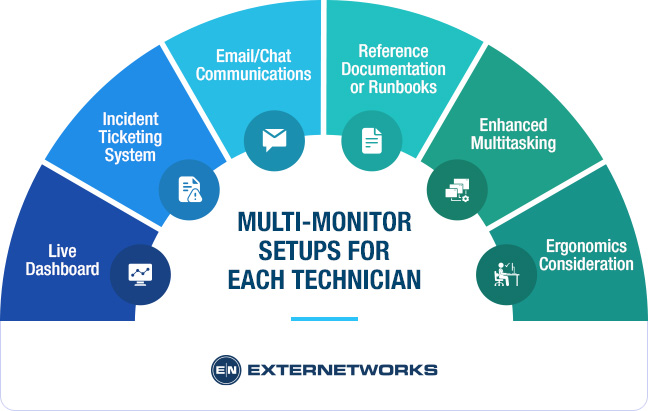
In today’s fast-paced technological environments, having a multi-monitor setup has become a critical component for technicians to maintain efficiency and effectiveness. The typical desk setup for each technician includes 2 to 4 monitors, strategically arranged to optimize workflow and communication. Let’s explore how each monitor serves a unique purpose and how this configuration enhances overall productivity.
Live Dashboard
One of the primary displays is dedicated to a live monitoring dashboard, a crucial tool for technicians responsible for real-time system surveillance. This dashboard provides an at-a-glance view of system health, performance metrics, and alerts that require immediate attention. By having a dedicated screen, technicians can swiftly identify and respond to issues as they arise, ensuring minimal downtime and prompt action.
Incident Ticketing System
The second monitor often features the incident ticketing system. This setup enables technicians to track and manage incoming and ongoing issues effortlessly. Having a separate screen for tickets ensures that new incidents are promptly acknowledged and can be dealt with systematically, greatly improving response times. This separation of tasks reduces the likelihood of overlooking critical alerts amidst background activities.
Email/Chat Communications
Communication is key in any technical environment. A third monitor dedicated to email and chat communications enables technicians to stay connected with their team, management, and stakeholders without disrupting other critical tasks. This constant connectivity facilitates seamless collaboration, quick sharing of information, and real-time updates, which are vital in resolving issues efficiently.
Reference Documentation or Runbooks
A fourth monitor, when available, can be invaluable for displaying reference documentation or runbooks. Having instant access to detailed guides, procedures, and troubleshooting steps saves technicians time when solving complex issues. This resource provides assurance and support, reducing the time spent searching for information and enhancing the accuracy of resolutions.
Enhanced Multitasking
Multi-monitor setups inherently boost the ability to multitask. Technicians can view and operate multiple tools simultaneously, switching between tasks with ease. This configuration significantly reduces the time spent on task switching and helps maintain concentration and workflow continuity. It empowers technicians to handle several aspects of their role without unnecessary disruption or confusion.
Ergonomics Consideration
Ensuring the ergonomic configuration of multiple monitors is crucial to prevent fatigue and strain. Height-adjustable mounts allow technicians to position monitors at an optimal visual angle, reducing the risk of neck and back problems. Glare-free screens further ensure comfort, reducing eye strain during long hours of work. Attention to these ergonomic details not only enhances productivity but also contributes to the overall well-being of technicians.
A multi-monitor setup is not just a luxury but a necessity for technicians working in demanding environments. The specific allocation of tasks across multiple screens maximizes efficiency while minimizing errors and oversight. By addressing both functional requirements and ergonomic considerations, companies can ensure their teams are equipped to meet the demands of modern technological challenges effectively.
On-site Equipment and Server Housing
In the heart of every Network Operations Center (NOC) lies a critical array of on-site equipment and server housing that builds the backbone of a robust IT infrastructure. By strategically accommodating essential hardware, a NOC ensures seamless network operation, rapid problem resolution, and fortified security. Here are the key components often housed within these facilities:
Backup Servers
At the forefront of any reliable IT strategy are backup servers. They act as a failsafe, storing critical data that can be swiftly retrieved in case of unexpected data loss or system failure. Utilizing a localized backup server within a NOC enhances data recovery speeds and reduces downtime, ensuring that an organization can maintain continuity and efficiency, regardless of external disruptions.
Network Switches
Network switches play a pivotal role in managing data flow across a network. Housed within a NOC, these devices facilitate intelligent data routing and ensure that information is delivered promptly to the intended destination. This centralized management enhances both network efficiency and reliability, minimizing data traffic congestion and optimizing communication pathways.
Local Firewalls
Security remains a top priority for any IT infrastructure, and local firewalls within a NOC serve as the primary line of defense against cyber threats. By filtering both incoming and outgoing network traffic based on established security rules, firewalls help prevent unauthorized access and shield sensitive data from potential breaches. Provided at the local level, these systems can be quickly adjusted to respond to evolving threats.
Redundant Power Supply Units
Continuity is non-negotiable in network operations, and redundant power supply units are integral in safeguarding against power interruptions. These systems ensure that critical equipment remains operational even during power failures, thereby maintaining network uptime and supporting ongoing operations without disruption. By including redundant power solutions, a NOC can effectively mitigate the risks associated with power outages and fluctuations.
Fast Diagnostics, Physical Reboots, and Secure Access
One of the paramount advantages of on-site equipment and server housing is the ability to conduct fast diagnostics and physical reboots. Engineers have immediate access to hardware, enabling rapid troubleshooting and resolution of any issues that may arise. This proximity enables technicians to perform direct interventions, such as hardware replacements or system resets, which aren’t always feasible with remote infrastructures. Additionally, physical access offers a higher degree of security, ensuring only authorized personnel can interact with sensitive equipment.
Modern Monitoring of Cloud and Hybrid Environments
It’s essential to note that while the core of a NOC’s capabilities may lie in physical equipment, many contemporary NOCs now extend their monitoring reach into cloud and hybrid environments. This integration enables comprehensive oversight of on-premises infrastructure and expansive cloud-based resources, providing a holistic view of an organization’s network performance and potential vulnerabilities. As such, NOCs can deliver a seamless combination of traditional hardware management and modern cloud oversight, ensuring the entirety of an organization’s IT estate is efficiently monitored and managed.
The on-site equipment and server housing within an NOC are vital to maintaining a resilient and responsive network infrastructure. By combining these essential components with advanced monitoring technologies, organizations can achieve unprecedented levels of operational efficiency and security.
Monitoring of Geographically Distributed Sites
In today’s digitally driven world, the ability to monitor multiple remote sites, branches, or data centers from a centralized location has revolutionized how organizations manage their operations. As businesses expand globally, the challenge of overseeing geographically dispersed infrastructures requires robust solutions that offer reliability, efficiency, and comprehensive oversight. This is where centralized monitoring comes into play.
Centralized Monitoring of Remote Sites
Centralized monitoring provides a unified platform that enables organizations to oversee various remote locations without the need for physical presence. By collating data from dissimilar geographic sites into a singular interface, organizations can streamline their monitoring efforts, thereby optimizing resource allocation and decision-making processes. This unified approach not only simplifies operations but also enhances the ability to rapidly detect and respond to anomalies or failures, mitigating potential downtime or disruptions.
The integration of centralized monitoring means that organizations can maintain a cohesive view of their entire operational landscape, ensuring that each site adheres to performance standards and security protocols. This holistic monitoring capability is crucial for maintaining consistency across the board and for ensuring that every branch or data center operates within prescribed parameters.
VPNs, SD-WANs, and Cloud Telemetry for Real-Time Visibility
The technologies enabling this centralized monitoring system include Virtual Private Networks (VPNs), Software-Defined Wide Area Networks (SD-WANs), and cloud telemetry. VPNs are instrumental in securely connecting multiple sites, ensuring data transmitted between them remains private and protected from unauthorized access.
Meanwhile, SD-WANs offer flexibility and increased reliability by directing traffic across the most efficient path, adapting to network conditions in real time. This adaptability ensures that data flow remains uninterrupted and efficient, even over long distances.
Cloud telemetry, on the other hand, provides real-time visibility into network and application performance, allowing organizations to access critical insights and perform predictive maintenance.
By leveraging these technologies, businesses can gain a comprehensive overview of their operations, making it easier to predict and prevent potential issues before they impact service delivery. Real-time visibility also empowers organizations to swiftly react to challenges, maintaining consistently high productivity and performance.
Supporting Global Clients and Ensuring High Uptime
A pivotal advantage of centralized monitoring systems is their capacity to support global clients while assuring nearly perfect uptime. With a single team capable of monitoring and managing assets worldwide, businesses can provide round-the-clock services, delighting clients with seamless and uninterrupted experiences. This not only enhances customer satisfaction but also lays the groundwork for building stronger client relationships, as organizations demonstrate an unwavering commitment to service excellence and reliability.
Achieving 99.99% uptime, which translates to just a few minutes of downtime per year, has become a benchmark for excellence in the digital age. Centralized monitoring systems play a critical role in reaching this high standard by enabling proactive management and rapid response capabilities. In an environment where uptime is synonymous with organizational reputation and client trust, centralized monitoring helps protect and enhance the value proposition of businesses on a global scale.
The monitoring of geographically distributed sites through centralized systems and advanced networking technologies is an indispensable component of modern organizational strategies. By providing a sweeping, integrative approach to monitoring, these solutions ensure operational coherence, promote efficiency, and uphold the rigorous standards of service expected in today’s competitive landscape.
Best Practices in NOC Design & Ergonomics
Designing a Network Operations Center (NOC) requires a strategic approach to ensure optimal performance, efficiency, and comfort for those who operate within it. Adopting best practices in design and ergonomics can significantly enhance workflow, safety, and future scalability. Below, we explore key factors to consider in creating a well-designed NOC environment.
Lighting, Ventilation, and Noise Control for Round-the-Clock Operations
NOCs typically operate 24/7, necessitating a workspace that maintains the well-being and productivity of its staff during long shifts. Proper lighting is crucial, with a preference for adjustable lighting levels that simulate daylight to help regulate employees’ circadian rhythms. Implementing indirect lighting options can reduce glare on screens, minimizing eye strain.
Ventilation is equally important. A well-ventilated space can prevent the buildup of heat from equipment and maintain air quality, reducing potential health risks. Installing high-efficiency air conditioning systems that can adapt to fluctuating temperatures is vital for maintaining a comfortable working environment.
Noise control is another essential component. The constant operation and communication inherent in a NOC can create auditory distractions. Incorporating soundproofing materials and sound-absorbing panels can help create a quieter workspace, allowing staff to concentrate and communicate more effectively.
Redundancy in Power and Internet Connections
Reliability is non-negotiable in NOC environments. Ensuring continuous operation requires redundant power systems, such as uninterruptible power supplies (UPS) and backup generators, to guard against power failures. Additionally, redundant internet connections, including diverse paths from multiple internet service providers, are essential for maintaining connectivity and ensuring uninterrupted operations in the event of network disruptions.
Security Access Controls
The sensitive nature of the data and operations handled within a NOC necessitates stringent security access controls. Implementing badge entry systems or biometric access controls can enhance security by restricting unauthorized access. These systems can track who enters or leaves specific areas, further strengthening security protocols and ensuring compliance with industry regulations.
Scalable Layout to Accommodate Growing Infrastructure and Team Size
As organizations grow, so too may the demands placed on the NOC. Designing a scalable layout allows for easy reconfiguration of space to accommodate additional equipment or personnel. Employing modular furniture systems, flexible cabling infrastructure, and adaptable workstations can facilitate seamless transitions, ensuring the NOC can evolve in step with technological advancements and organizational changes.
By integrating these best practices in NOC design and ergonomics, organizations can create a robust, efficient, and future-proof environment that supports staff, promotes security, and enhances operational readiness.
Conclusion
As we reflect on the intricacies of crafting an efficient Network Operations Center (NOC) layout, several key components stand out as essential for achieving seamless operations. First and foremost, the physical arrangement of workstations must facilitate easy communication and swift collaboration among team members. An open, unobstructed floor plan helps minimize delays and fosters a cooperative atmosphere that is crucial for rapid problem-solving.
The integration of advanced technology cannot be overlooked. High-resolution monitors that display crucial data in real-time, along with sophisticated alert mechanisms, ensure that the team can respond to issues swiftly and effectively. Furthermore, ergonomic furniture plays a significant role in maintaining the health and comfort of staff, which in turn enhances overall productivity and reduces downtime caused by operator fatigue.
The impact of a well-thought-out NOC design on uptime, productivity, and response times is profound. A streamlined layout reduces the likelihood of errors and accelerates incident response, directly improving system reliability. An operationally efficient NOC ensures that network issues are detected and resolved with minimal delays, ultimately safeguarding the organization against costly outages and service disruptions.
To summarize, the benefits of a well-planned NOC layout extend beyond immediate operational efficiency. Proactive design planning is paramount, especially when preparing for future infrastructure scaling. By anticipating growth and incorporating flexibility into the design, organizations can adapt to evolving technological needs without compromising on performance or reliability. This foresight not only supports current operational demands but also fortifies the organization’s capability to expand seamlessly in the future.
Ultimately, investing time and resources into a comprehensive design strategy for your NOC will pay dividends in maintaining high levels of uptime and operational effectiveness. By prioritizing intelligent layout planning, businesses can secure a resilient foundation that supports both current operations and future growth ambitions.
Looking to Optimize Your Network Operations Center?
Contact ExterNetworks today to schedule a complimentary consultation with our NOC architecture experts.
Contact Us